Search in blog

Showing posts with label Security Updates. Show all posts

Sunday, 8 February 2015

Auto-remove windows updates


  • Windows updates makes the computer run slow. When I help others to get more speed from their computer. I sit for hours and removes all security updates. Now it's the end of it. I have used the AutoHotkey to do it automatically. I have one for the Swedish system (tested on Windows 7 and 8) and one in English (not tested).
  • All you have to do is:
    • 1# Download file
    • 2# Run it
    • 3# Go to Control Panel> Programs and functions> Installed Updates and search for "update for Windows"
    • 4# press F3 (start script)
    • 5# Press the OK button (in the window that came up at point 4#)
      The script will start when the "installed updates" window is in focus.
    • (6# Abort with Escape button)

    Ladda ner för svenska system:
    https://drive.google.com/open?id=0BxE4k4xEiNO2UEI0cUVLTDR2SDQ

    Download for English systems:
    https://drive.google.com/file/d/0BxE4k4xEiNO2QzdjY0VoVG9hQWM/view?usp=sharing
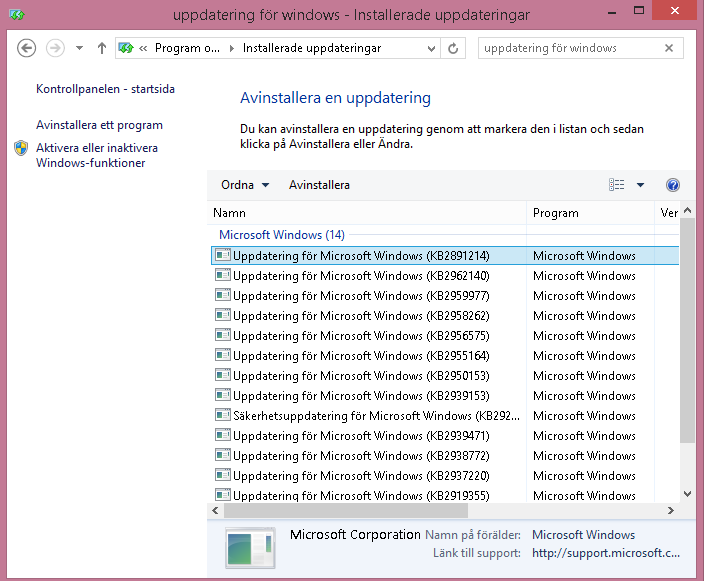

    Click on this window on your computer to make it in focus

Monday, 23 June 2014

Faster computer or more secure computer?

I hear this all the time. "My computer is slow." "Ok, do you want a fast and more secure computer, you can not have both."

Do this:

  1. Turn off automatic updates.
    Control Panel > Windows Update > Change settings
  2. You have 4 choices. But do not choose the first thing that is "recomended". I personally have the last one "Is not recomended." I want to Update when I have a problem otherwise never.
  3. Uninstall all "Security Updates" (See Image)
    Control Panel > Programs and settings > Show updates
    (OBS if you want to install Windows 8.1 dont uninstall the security updates that got KBxxxxx80-89 numbers, you need them.)
  4. You might have 190 Updates so it takes a few hours. But afterwards, the computer goes faster. (When you are about to uninstall and it asks you to reboot, do not. Reboot when finished.)