- When working with pixel graphics, and you want to scale up the image with Photoshop, without smudging. Ctrl + K and select Nearest Neighbour.
- Windows updates makes the computer run slow. When I help others to get more speed from their computer. I sit for hours and removes all security updates. Now it's the end of it. I have used the AutoHotkey to do it automatically. I have one for the Swedish system (tested on Windows 7 and 8) and one in English (not tested).
- All you have to do is:
- 1# Download file
- 2# Run it
- 3# Go to Control Panel> Programs and functions> Installed Updates and search for "update for Windows"
- 4# press F3 (start script)
- 5# Press the OK button (in the window that came up at point 4#)
The script will start when the "installed updates" window is in focus.
- (6# Abort with Escape button)
Ladda ner för svenska system:
https://drive.google.com/open?id=0BxE4k4xEiNO2UEI0cUVLTDR2SDQ
Download for English systems:
https://drive.google.com/file/d/0BxE4k4xEiNO2QzdjY0VoVG9hQWM/view?usp=sharing
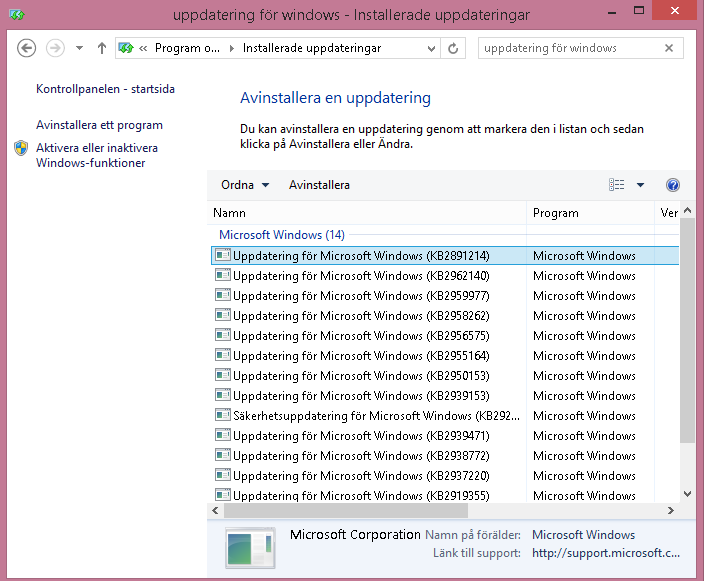
Click on this window on your computer to make it in focus
- To fix the load game issues
Use "Save" the first time you create your household.
Then NEVER EVER use "Save". Use "Save as". (Yes you must delete some old savegames but the games loads a lot faster next time)
When you exit sims 3 and the game asks you: Save game? PRESS NO!!! (Use "SAVE AS" before you exit)
When you change city and the game asks you: Save city? PRESS NO (or continue without save)!!! (Use "SAVE AS" after)
NEVER EVER click "Save". Only use "SAVE AS".
- The Sims 3 freezes when playing. Especially when you play Isla Paradiso.
Why you ask. Well simulation is the answer.
All households who are around you need to be stimulated. You say to your Sim to cook. But the computer must simulate all computer played Sims households around you to do things.
- Computer do your sims stuff: takes 100 milliseconds.
Computer do Scott family (4 sims) stuff: takes 4*100 milliseconds.
Computer do Mark family (4 sims) stuff: takes 4*100 milliseconds.
... On Isla Paradiso are about 20 (4 sims) families living on the island that must be simulated. 20*4*100=8000 milliseconds. THATS 8 SECONDS.
- The solution. Go to "Change city" and wrecks (move out) all families in the city. Let shops and other facilities remain. You will still be visited by Sims even if no one else but you live in the city.
- If you can not get into the settings on Windows 8, it is probably because your profile is broken. You can create a new profile with the administrator account.
- To enable the Administrator account, do the following:
- Go to the start menu (press the Windows key on your keyboard).
- type cmd (eller kommando på svenska)
- Right-click the command prompt and press Run as administrator
- If you can't run as administrator do this:
- Reboot computer and press F8 just before you see the windows logo.
- In the menu click "Failsafe mode".
- Select your broken profile and login, yes it works here.
- Go to the start menu (press the Windows key on your keyboard).
- type cmd (eller kommando på svenska)
- Right-click the command prompt and press Run as administrator
- Type the following into the box that appears:
- net user administrator /active:yes
- På svenska: net user administratör /active:yes
- Press enter
- It should read "command performed" or similar
- Go to the Start menu (Windows key)
- Press your icon in the right corner and select Administrator
- You must log in to the Administrator account
- Now, go to the control panel and user accounts.
- Press Manage another account.
- Press Add Account.
- Press the Add button.
- Press to log in without a Microsoft account (not recommended).
- Local account.
- Enter your new username and password.
- You now have a new administrator account
- Log on to the new account so we disable the system account.
- Go to the Start menu (Windows key)
- Press your icon in the right corner and select your new account
- Go to the start menu (press the Windows key on your keyboard).
- type cmd (eller kommando på svenska)
- Right-click the command prompt and press Run as administrator
- Type the following into the box that appears:
- net user administrator /active:no
- På svenska: net user administratör /active:no
- Press enter
- It should read "command performed" or similar
- To turn on silent mode on a nexus 5 with lolipop:
Press the sound up/down button once:

Press priority and press the options/config/gear:

Set it like this:

- All done. You are now in "Silent mode". To turn off silent mode just press the sound up/down:
And press the "All" button.
Now when you press the "priority", you will enter into "silent mode" and when you press "all" will be in normal mode. You do not need to lower the volume to silence your phone. In the "silent mode", you will still hear the alarm clock as usual.


